FinE-Xtreme Software is an application specifically designed to streamline the daily operations of Savings and Credit Co-operative Unions (SACCOs) and Micro-Finance Institutions (MFIs). Developed, owned, and maintained by Lanstar Technologies Ltd (K), FinE-Xtreme comes equipped with both a Back Office Service Activity (BOSA) module and a Front Office Service Activity (FOSA) module. Additionally, optional modules such as Inventory Management, Micro Finance, and Payroll systems are available to enhance its functionality.
Lanstar Technologies specializes in software solutions for SACCOs and microfinance institutions (MFIs), offering customizable options to meet the specific needs of SACCO operations. Additionally, we provide comprehensive networking services to ensure seamless connectivity and optimal performance for your organization.
All transactions entered into the system are processed in real time, allowing for the generation and printing of accounting reports at any moment.
Conventions Used in This Document
- SACCO: Savings and Credit Co-operative Union
- MFIs: Micro-Finance Institutions
- BOSA: Back Office Service Activity
- FOSA: Front Office Service Activity
Finally, unless explicitly defined, the term "the system" shall be used to refer to the FinE-Xtreme application software.
Running the FinE-Xtreme System
Click on FinE-Xtreme from the Windows Start menu. (Alternatively, you can use the shortcut on your desktop to launch the system.
The following example shows the initial interface that appears after clicking the FinE-Xtreme icon on your desktop or from the Windows Start menu:
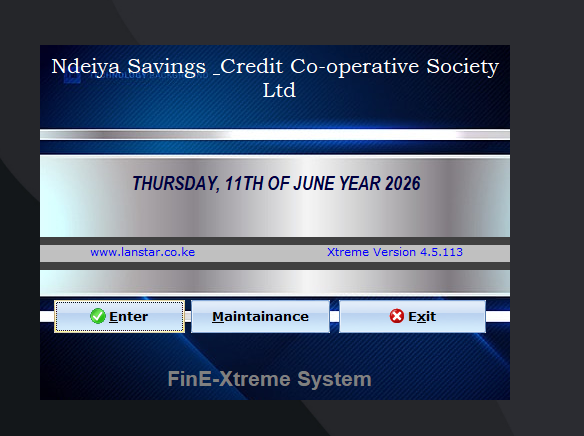
Main Interface Overview
The main interface features three buttons:
Enter: Click the Enter button to access the entire system. Authentication is required, so enter your username and password. If you don't have a username and password, contact the administrator.
- Maintenance: Click the Maintenance button to access the maintenance sub-system. Authentication is required, so enter your username and password. If you don't have a username and password, contact the administrator. The maintenance sub-system is used for the overall configuration of the system based on the society's information.
- Exit: Click the Exit button to leave the main interface.
Appearance and Depiction of the System
- Menu Bar
At the top, the menu bar includes the following modules:
- Company
- Fosa Activities
- Members
- Maintenance
- Loan Management
- Parameters
- Processes
- Salary and Deductions
- Accounts
- Dividends
- Security
- Reports
- Add-ins
- Help
Detailed information about the functionalities of these menus and their sub-menus will be provided.
- Left Section
The left section of the system is dedicated to Front Office (FOSA) operations, such as Tellers. It includes various sub-menu shortcuts, such as:
- Teller Activities
- Cross-Teller Transactions
- Treasury Transactions
- Other Activities
- Debtors & Creditors
- Bottom Section
The bottom section is the status bar, which contains the following information from left to right:
- The user currently logged into the system
- The operating period or year
- The SACCO name
- The current date
- The host IP address
- Branch
- Right Section
The right section displays brief reports of the SACCO, which can also be accessed in the Reports module.